
How to Play Zip Game
Zip Game is a path-drawing puzzle: you draw a single line through every cell of the grid, in a specific order, without ever crossing yourself or a wall. Here's exactly how it works.
Ways to Play
Daily Puzzle
A new puzzle every day, the same for every player. Resets at midnight UTC.
Play today's puzzle →Unlimited
Practice as much as you want, at any difficulty from 5×5 to 8×8. No daily limit.
Play Unlimited →Archive
Missed a day? Browse and replay every past daily puzzle, sorted by date.
Browse the Archive →The Core Rules
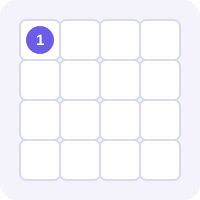
1. Start at 1
Every puzzle has numbered cells. Your path must begin on the cell numbered 1 — that's always your starting point, no matter the grid size.
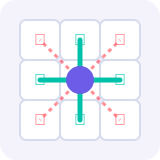
2. Move up, down, left, or right
Drag (or tap) to a cell directly next to your current one. Diagonal moves aren't allowed, even when a corner cell looks like the shortest way there.
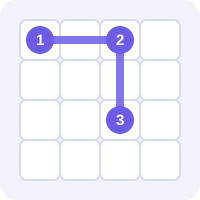
3. Visit every number in order
As your path grows, it must reach 2, then 3, then 4, and so on — you can't skip ahead or touch a number out of sequence. You can pass through as many unnumbered cells as you like on the way to the next one.
Path: 1 → ⋯ → 2 → ⋯ → 3
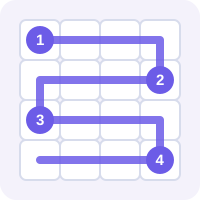
4. Fill the entire grid
The puzzle isn't solved just by connecting the numbers — your path has to pass through every single cell on the board exactly once, with no gaps and no repeats.
Understanding walls
Some puzzles have short wall segments drawn on the edge between two cells. Your path can never cross a wall, even if the two cells are right next to each other — you'll have to route around it.
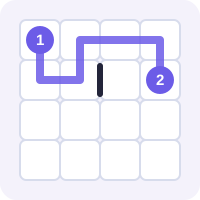
Controls: Mouse or Touch
You can play Zip with a mouse, trackpad, or touchscreen — the controls work the same way either way.

Mouse & trackpad

Touchscreen
Draw your path
Click (or tap) the cell numbered 1, then drag to an adjacent cell to extend your path. Keep dragging from cell to cell to draw the whole route. You can also click or tap each adjacent cell one at a time instead of dragging.
Undo a mistake
Drag backward over your own path to erase the last few steps, or click any earlier cell on your path to jump back to that point instantly. The Undo button removes one step at a time, and Reset clears the whole path so you can start over.
Tips to Solve Faster
Look at the highest number first
Cells with few open neighbors (corners, cells boxed in by walls) often force a specific path — spot those early.
Find forced moves
If a cell only has one unvisited neighbor left, your path has no choice but to go there. Chaining these forced moves together solves large parts of the grid for free.
Avoid boxing yourself in
Before committing to a path, check whether it would seal off a region of cells your path can no longer reach.
Work backward from the last number
Planning routes from both ends toward the middle often reveals the solution faster than only working forward from 1.
Common Mistakes
- Dragging past a number out of order — the move simply won't register, so if your path stops extending, check which number you need next.
- Forgetting that walls block movement even between cells that look adjacent on the grid.
- Filling in easy areas first and accidentally leaving an isolated cell that nothing can reach.
Frequently Asked Questions
Do I need a LinkedIn account to play?
No. This is free to play in your browser with no account, sign-up, or app install required.
Is this the official LinkedIn Zip game?
No. This is an independent, free version of the same number-path puzzle format popularized by LinkedIn's daily games. It isn't affiliated with or endorsed by LinkedIn.
Do I have to visit the numbers in exact order?
Yes. Your path must reach 1, then 2, then 3, and so on in sequence — you can't touch a later number before an earlier one.
Can I skip a cell and fill it in later?
No. Your path has to be one continuous line with no gaps, so every cell gets filled exactly once as you draw.
What if I make a mistake mid-puzzle?
Drag backward over your own path to erase recent steps, click an earlier cell on your path to jump back to it, or use the Undo and Reset buttons.
Is there a new puzzle every day?
Yes. The Daily puzzle resets at midnight UTC and every player sees the same puzzle that day.
Can I play a puzzle from an earlier day?
Yes — the Archive lists every past daily puzzle so you can pick any date and play it.
Does it work on my phone?
Yes. Tap and drag with your finger the same way you'd click and drag with a mouse — no app needed.